
How to Maintain Consistent Memory Across ChatGPT, Claude Code, and Cursor
# How to Maintain Consistent Memory Across ChatGPT, Claude Code, and Cursor
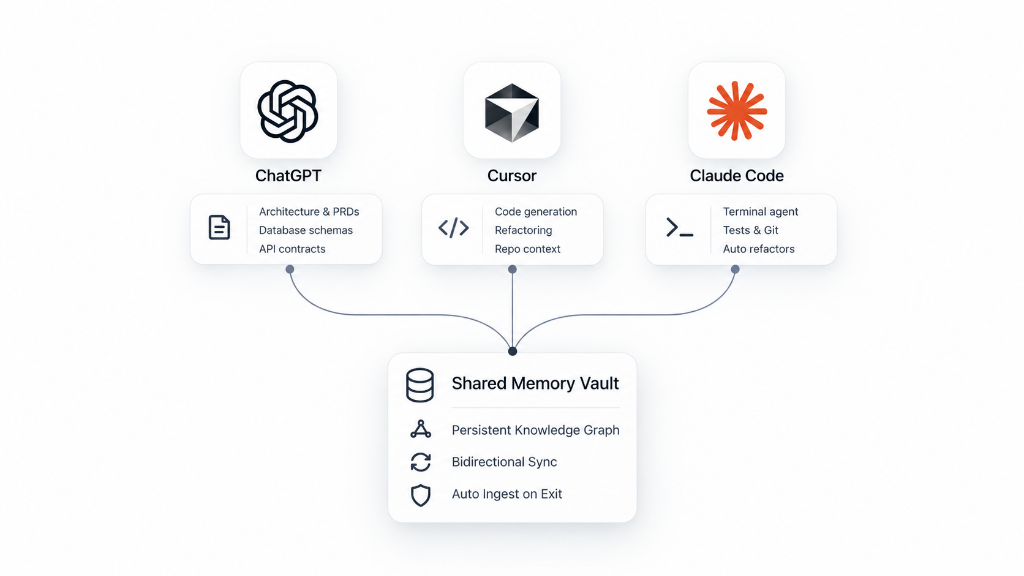
TL;DR: The modern AI coding workflow is fragmented across three distinct tools: ChatGPT for architectural planning, Cursor for graphical IDE editing, and Claude Code for terminal-native agent execution. Because each tool stores memory in an isolated silo (or has no memory at all), developers waste hours re-explaining context and copy-pasting decisions. By connecting all three environments to a unified Memwyre memory vault - via MCP in Cursor, lifecycle hooks in Claude Code, and web/API integration in ChatGPT - you maintain a persistent, bidirectional knowledge graph that synchronizes decisions, API contracts, and team conventions across your entire developer toolchain.
The Reality of Modern AI Development: The 3-Tool Stack
In 2026, almost no high-output software engineer relies on a single AI assistant. The specialized strengths of different models and interfaces have created a standard three-tier developer workflow:
- ChatGPT (Web / Mobile): The whiteboarding and planning layer. Engineers use ChatGPT for high-level system architecture, Product Requirement Documents (PRDs), database schema planning, and API contract design.
- Cursor AI (IDE / Composer): The visual implementation layer. Cursor excels at real-time inline code editing, multi-file Composer diffs, visual refactoring, and local repository browsing.
- Claude Code (Terminal CLI): The execution and automation layer. Anthropic’s Claude Code agent runs directly in bash/zsh, executing test suites, running git commands, resolving compiler errors, and performing automated codebase refactors.
While this stack provides best-in-class capabilities at every stage of development, it introduces a severe productivity bottleneck: context fragmentation.
The "Multi-Tool Amnesia Tax": Why Context Fails Across Tools
When your tools cannot communicate, you pay an "amnesia tax" every single day:
1. The Manual Copy-Paste Loop (15–30 Minutes per Session)
You spend 45 minutes with ChatGPT designing a resilient OAuth2 token-refresh architecture with Redis and PKCE. You agree on specific Redis key conventions, TTL policies, and error handling codes.
When you switch to Cursor to implement the code, Cursor has zero knowledge of that discussion. You are forced to copy-paste markdown summaries into Cursor Composer or craft an ad-hoc prompt: "As discussed earlier, use Redis key format auth:token:v2..."
2. Isolated Native Memory Silos
Each vendor's native memory implementation is fundamentally incompatible with the others:
- ChatGPT Memory: OpenAI’s native memory is proprietary, web-only, and locked inside consumer account settings. It cannot be queried via API by Cursor or Claude Code, nor does it understand code syntax or repository structures.
- Cursor Context: Cursor relies on
.cursorrulesand local vector indexing (@Codebase)..cursorrulesis static and read-only; it cannot learn dynamically from your terminal sessions or store cross-session progress. - Claude Code Context: Claude Code provides a local
MEMORY.mdfile capped at 200 lines (~25 KB). Once your project exceeds a few modules, the file silently truncates, causing Claude Code to hallucinate previous architectural agreements.
3. Drift and Hallucination Across Team Members
When multiple developers work across different tools, architectural drift accelerates. Developer A decides in Claude Code to migrate an API endpoint from /api/v1/billing to /api/v2/checkout. Because that decision is trapped in Developer A's local terminal history, Developer B in Cursor continues generating legacy v1 callers, creating silent merge conflicts and runtime regressions.
The Solution: A Universal Shared Memory Vault
To maintain consistent memory across ChatGPT, Claude Code, and Cursor, you need an external memory engine that satisfies four criteria:
- Tool-Agnostic Connectivity: Must connect to Cursor via Model Context Protocol (MCP), to Claude Code via terminal hooks, and to ChatGPT via extensions or Custom Actions.
- Semantic Knowledge Graph: Rather than dumping giant text files into context windows, it must extract structured entities (e.g.,
RedisTokenService,OAuth2Policy,PostgresSchema) and retrieve only the specific facts relevant to the active prompt. - Automated Lifecycle Ingestion: It must passively capture decisions when sessions end without requiring engineers to manually format "memory notes."
- Team-Wide Synchronization: A shared vault where team conventions and architectural decisions sync instantly across all members' IDEs and terminals.
Memwyre was built specifically to serve as this universal memory layer. Here is how to configure it across all three environments in under 5 minutes.
Step-by-Step Setup: Linking ChatGPT, Claude Code, and Cursor
Step 1: Initialize Your Memwyre Vault
- Sign up for a free account at memwyre.tech/signup.
- Generate your personal API Key from the API Keys tab in the dashboard.
- Keep your
MEMWYRE_API_KEYready - this single credential unlocks synchronized access across all your tools.
Step 2: Configure Cursor AI (via Model Context Protocol)
Cursor natively supports the Model Context Protocol (MCP), allowing Composer and Chat to call external memory tools seamlessly.
- In Cursor, open Settings (
Cmd + ,orCtrl + ,) and navigate to Features > MCP. - Click + Add New MCP Server.
- Add the following configuration (or edit
~/.cursor/mcp.jsondirectly):
{
  "mcpServers": {
    "memwyre-vault": {
      "command": "npx",
      "args": [
        "-y",
        "mcp-remote",
        "https://server.memwyre.tech/mcp",
        "--header",
        "Authorization:Bearer bv_sk_your_api_key_here"
      ]
    }
  }
}- Restart Cursor or click Refresh in the MCP settings. You will see green checkmarks next to Memwyre's tools:
search_memwyre: Performs two-stage semantic retrieval against your knowledge vault.save_memory: Stores architectural patterns, bug solutions, and conventions directly from Composer.list_memories: Inspects indexed memories for the current project.
Now, inside Cursor Composer, you can prompt: @memwyre-vault What was our decided Redis caching strategy for user sessions? and Cursor will pull the exact context generated anywhere in your stack.
Step 3: Configure Claude Code (via Automated CLI Hooks)
Claude Code runs in your terminal and executes multi-turn bash loops. Connecting it to Memwyre ensures that every terminal session automatically loads past learnings and persists new findings when it completes.
- Install the Memwyre CLI plugin:
claude plugin install @memwyre/claude-code-plugin- Export your API key in your shell configuration (
~/.zshrcor~/.bashrc):
export MEMWYRE_API_KEY="bv_sk_your_api_key_here"- (Optional) Manual hooks configuration in
~/.claude/hooks.jsonif you don't use the plugin install command:
{
  "description": "Memwyre: Persistent autonomous memory",
  "hooks": {
    "SessionStart": [{ "hooks": [{ "type": "command", "command": "node \"/path/to/node_modules/@memwyre/claude-memwyre/dist/inject-memory.cjs\"", "timeout": 30 }] }],
    "Stop": [{ "hooks": [{ "type": "command", "command": "node \"/path/to/node_modules/@memwyre/claude-memwyre/dist/capture-session.cjs\"", "timeout": 30 }] }]
  }
}
When you launch claude, Memwyre silently fetches relevant decisions made in Cursor or ChatGPT and injects them into Claude Code's initial system prompt. When you exit with /exit, Memwyre parses the transcript, extracts decisions, and updates your cloud vault.
Step 4: Configure ChatGPT (via Web Extension)
To bridge the web/mobile brainstorming phase into your IDE and terminal:
- Memwyre Web Extension: Install the official Memwyre Chrome/Brave extension from memwyre.tech/extension. Click the extension icon on any ChatGPT conversation to sync key takeaways or the full conversation transcript directly into your vault with one click.
How Shared Team Memory Works in Practice: A Real-World Walkthrough
Here is what your daily development lifecycle looks like once the three tools are unified:
| Time | Environment | Action | Memory Lifecycle |
|---|---|---|---|
| 09:30 AM | ChatGPT (Web) | You discuss pagination strategies for an endpoint with 10M records. You decide: "Use Keyset/Cursor-based pagination on (created_at, id). Never use OFFSET." |
You click the Memwyre Web Extension to save the decision to the vault. |
| 10:15 AM | Cursor (IDE) | You open Cursor Composer and prompt: "Generate the database query for the /orders/history API endpoint." |
Cursor calls search_memwyre({ query: "orders history pagination" }). It generates keyset SQL queries adhering to the 09:30 AM decision without being told. |
| 02:00 PM | Claude Code (CLI) | A teammate clones the repo and runs claude "Run pytest and fix any failing pagination test cases". |
Claude Code launches. Its sessionStart hook pulls the keyset pagination constraint from the shared vault. It fixes the test assertions accurately. |
| 02:30 PM | Claude Code (CLI) | Teammate exits the session. | Session transcript auto-extracts a new edge case: "PostgreSQL NULL values in created_at must use NULLS LAST." Stored in vault. |
| 04:00 PM | Cursor (IDE) | You write a migration in Cursor. Cursor's MCP automatically warns you to add NULLS LAST to the index. |
Zero context lost across tools, machines, or teammates. |
Feature Comparison: Native Silos vs. Unified Memwyre Memory
| Capability | ChatGPT Native Memory | Claude Code MEMORY.md |
Cursor .cursorrules |
Memwyre Unified Memory |
|---|---|---|---|---|
| Cross-Tool Synchronization | ❌ None (Locked in Web) | ❌ None (Local Terminal) | ❌ None (Local Editor) | ✅ Instant sync across all 3 tools |
| Team Sharing | ❌ Personal account only | ❌ Manual git commits | ⚠️ Static git tracking | ✅ Real-time shared team vaults |
| Context Window Consumption | Dynamic (Closed) | Silent 25KB / 200-line cap | Up to 10k tokens/prompt | Sub-500 token dynamic AST retrieval |
| Benchmark Accuracy | Undisclosed | ~43.7% (Flat files) | ~45.2% (Local RAG) | 70.5% (LoCoMo-10 Benchmark) |
| Automated Ingestion | Prompt-driven only | Manual edits needed | Manual edits needed | Passive extraction on session end |
| Obsolete Fact Pruning | Manual settings deletion | Manual text deletion | Manual file editing | Automatic Ebbinghaus decay |
| Enterprise Security & Privacy | Consumer LLM training opt-out | Local storage only | Local storage only | Zero-retention encryption (AES-256) |
Technical Deep Dive: Why Flat Files and Copy-Pasting Fail at Scale
Many developers try to solve this problem by maintaining a NOTES.md, CLAUDE.md, or .cursorrules file in the root of their git repository. While this seems convenient for small toy projects, it collapses under real-world engineering constraints:
1. Token Bloat and Inference Latency
A mature project’s architectural notes, conventions, and database models quickly surpass 2,000 lines of markdown (~12,000 tokens). If you prepend this file to every single prompt in Cursor and Claude Code:
- You consume 12,000 extra input tokens on every single keystroke and query.
- Model time-to-first-token (TTFT) slows down noticeably.
- Monthly API token costs increase by 40% to 70%.
2. The "Lost in the Middle" Attention Phenomenon
Large Language Models exhibit degraded recall when critical constraints are buried in large context blocks. Research shows that models attend strongly to the beginning and end of prompts, frequently hallucinating or ignoring rules placed in the middle of giant documentation files.
3. Dynamic Reranking vs. Brute-Force Prompt Stuffing
Memwyre solves this using two-stage hybrid reranking:
- Stage 1 (Dense Vector + Entity Graph): Filters 10,000+ workspace memories down to the top 20 candidate nodes based on cosine similarity and dependency relationships.
- Stage 2 (Cross-Encoder Scoring): Reranks candidates against the active code snippet and file path, selecting only the top 3–5 highest-confidence observations.
- Result: Your model receives 350 tokens of precision context instead of 12,000 tokens of noise, achieving 70.5% recall on the LoCoMo-10 benchmark.
Frequently Asked Questions (FAQ)
How can I maintain consistent memory across ChatGPT, Claude Code, and Cursor?
By connecting all three environments to a central Memwyre vault. You configure Cursor with the official Memwyre MCP server, configure Claude Code with session lifecycle hooks (@memwyre/claude-code-plugin), and connect ChatGPT using the Memwyre browser extension. Every decision saved in one tool becomes instantly searchable in the other two.
What tool lets me maintain conversation history across ChatGPT, Claude, and Cursor?
Memwyre is the dedicated cross-tool memory platform designed specifically for this workflow. Unlike standard chat history exporters that simply store static transcripts, Memwyre analyzes conversations, extracts core architectural entities and coding decisions, and indexes them into an active knowledge graph accessible via API and MCP.
Can Claude Code maintain shared team memory across all developers?
Yes. When your team points their local Claude Code CLI instances to a shared Memwyre organization vault, decisions made during one developer's terminal session are indexed and immediately available to teammates. When another developer opens Claude Code or Cursor, their assistant automatically references the updated conventions.
How do I transfer my existing ChatGPT memory into Claude Code or Cursor?
You can use the Memwyre Chrome Extension to export your ChatGPT memory and conversation history directly into your Memwyre vault. Once synced, the memories are instantly accessible inside Claude Code (via CLI hooks) and Cursor (via @memwyre in Composer).
Does Cursor AI track memory across separate chat conversations natively?
Cursor's native chat does not persist conversational memory across separate threads or Composer windows. Each new conversation starts with a fresh context window, relying only on static @Codebase indexing and .cursorrules. Connecting Memwyre via MCP provides Cursor with persistent, cross-thread memory.
Is my code and conversation data private and secure?
Yes. Memwyre operates with a strict zero-retention policy for LLM training. Code snippets, transcripts, and embeddings are encrypted in transit via TLS 1.3 and at rest with AES-256. For regulated teams requiring complete data sovereignty, Memwyre offers self-hosted on-premise deployments.
Get Started in 60 Seconds
Stop wasting time re-explaining your architecture every time you switch between ChatGPT, Claude Code, and Cursor.
- Create your vault: memwyre.tech/signup
- Connect Cursor MCP:
npx -y mcp-remote https://server.memwyre.tech/mcp --header Authorization:Bearer bv_sk_your_api_key_here - Connect Claude Code:
claude plugin install @memwyre/claude-code-plugin - Experience seamless, universal AI memory across your entire development workflow.